Introducing Rusty PIMA — Because Your Fingering Markups Shouldn't Look Like Hieroglyphics
Annotate, fingerpick, and argue over 7th-fret barre choices with your students and ensemble — live in real time, without losing your sanity or your graphite pencils.
Classical guitarists live in a uniquely chaotic world of musical notation. Between left-hand finger numbers (1, 2, 3, 4), right-hand PIMA letters (p, i, m, a, c), circled string numbers (①–⑥), Roman numeral barre indicators (CVII), and mysterious pencilled arrows from 1994, a single sheet of Villa-Lobos Etude No. 1 ends up looking less like sheet music and more like an FBI crime scene evidence board.
And if you're a teacher trying to explain to a student over Zoom why their 3rd finger shouldn't be jumping across three strings during a tremolo passage? Good luck holding up a crumpled piece of paper to your webcam while praying your WiFi doesn't drop.
Today we're introducing Rusty PIMA — a collaborative, real-time PDF score editor built specifically for classical guitarists, guitar professors, and ensemble players who are tired of fighting paper. Powered by a lightning-fast Rust CRDT engine, our Linux desktop release (.deb & .rpm) is available now, with native iOS, Android, Mac, and Windows versions coming soon!
"Finally, a score editor that understands why 'p-i-m-a' isn't a typo, why a half-barre at the V fret deserves its own dedicated button, and why your metronome has been gathering dust as a paperweight since 2018."
A Dashboard That Gets Straight to Business
We know guitarists spend enough time tuning 6th strings down to D. The last thing you need is a 12-step menu just to open a score. The Rusty PIMA dashboard gets you into your music instantly: join a live room with a quick 6-character code, open a local PDF, or jump straight back into last Tuesday's masterclass score.
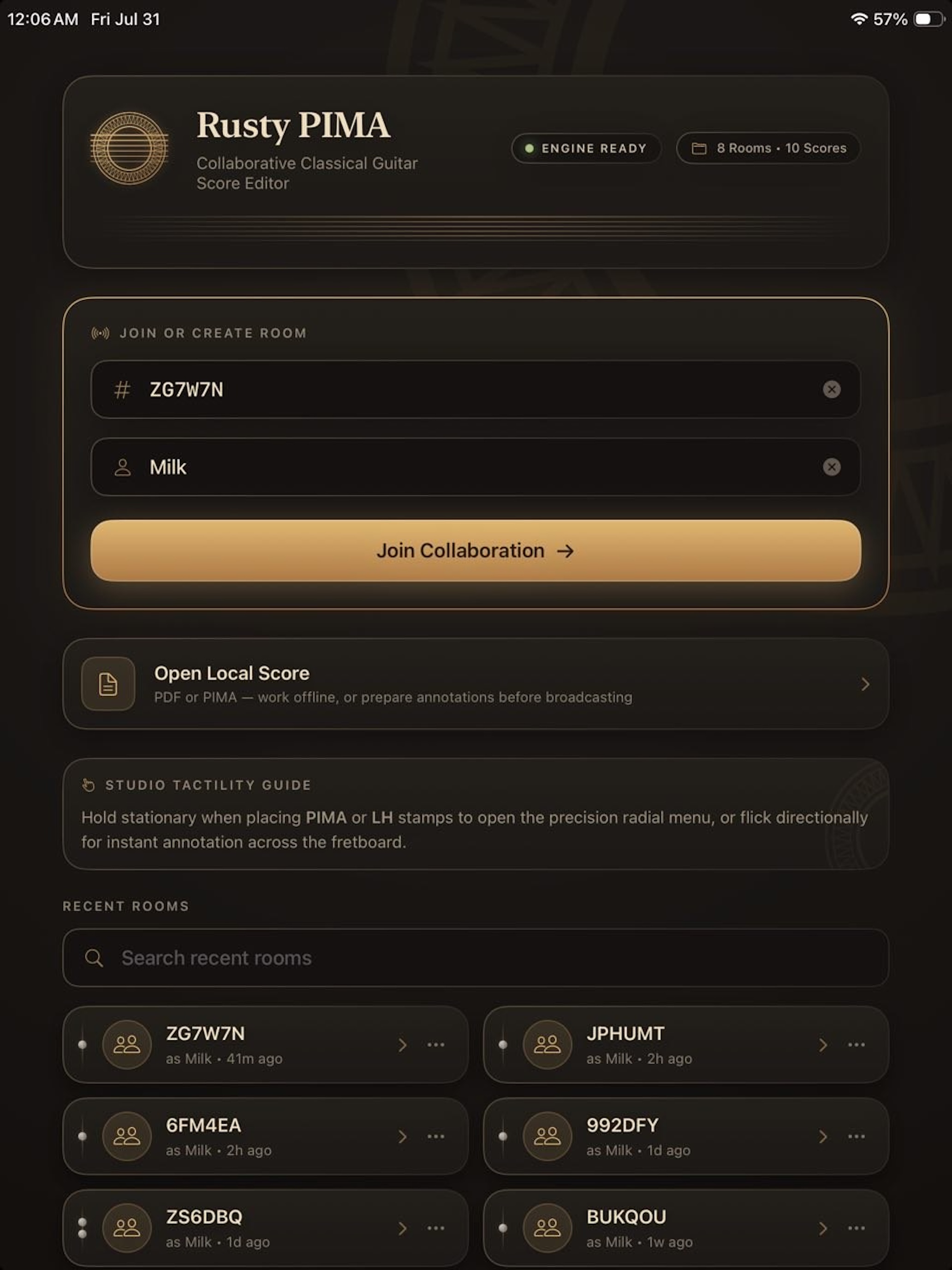
With live status badges on recent rooms, you'll immediately see if your duet partner is already in the room waiting for you, or if they're still in the hallway searching for their tuning fork.
Built Specifically for Guitarists (No Compromises)
Generic PDF annotators think "PIMA" is a brand of sports shoes and assume classical guitarists just want a yellow highlighter tool. If your professor ever caught you writing fingering numbers in thick Sharpie on an expensive Henle edition, you know the emotional trauma. We built tools tailored directly to classical fretboard logic:
PIMA Fingering Stamps
One-tap right-hand stamps (p, i, m, a, c). Say goodbye to chicken-scratch letters hovering awkwardly over treble notes.
Barre Chord Tool
Place Roman numeral barre indicators (CIII, CVII, ½C) with clean dashed span lines. Fits cleanly across any measure.
LH & String Stamps
Drop left-hand fingerings (1–4, 0, X) and circled string indicators (①–⑥) onto notes without messing up your layout.
Stylus Pen & Highlighter
Silky smooth Apple Pencil support. Highlight tricky shifts in golden amber or mark dynamics with sub-millimetre accuracy.
Comment Pins
Pin expandable notes directly to measure 42: "Relax your thumb here!" — far more polite than yelling over Zoom.
Audio Snippets
Record a 5-second audio demonstration and pin it straight onto the PDF. Your student can hear the exact phrasing right where they need it.
Multi-Size Screen Tracking
Teacher "Follow Me" mode syncs viewports in real time using normalized coordinates. Whether on a widescreen desktop monitor or a 4:3 iPad, everyone stays centered on the exact same measure automatically.
Annotation Canvas in Action
When you open a score, all your tools sit right in a compact top bar. Switch from placing a 4th-finger stamp to drawing a crescendo line in less than half a second.
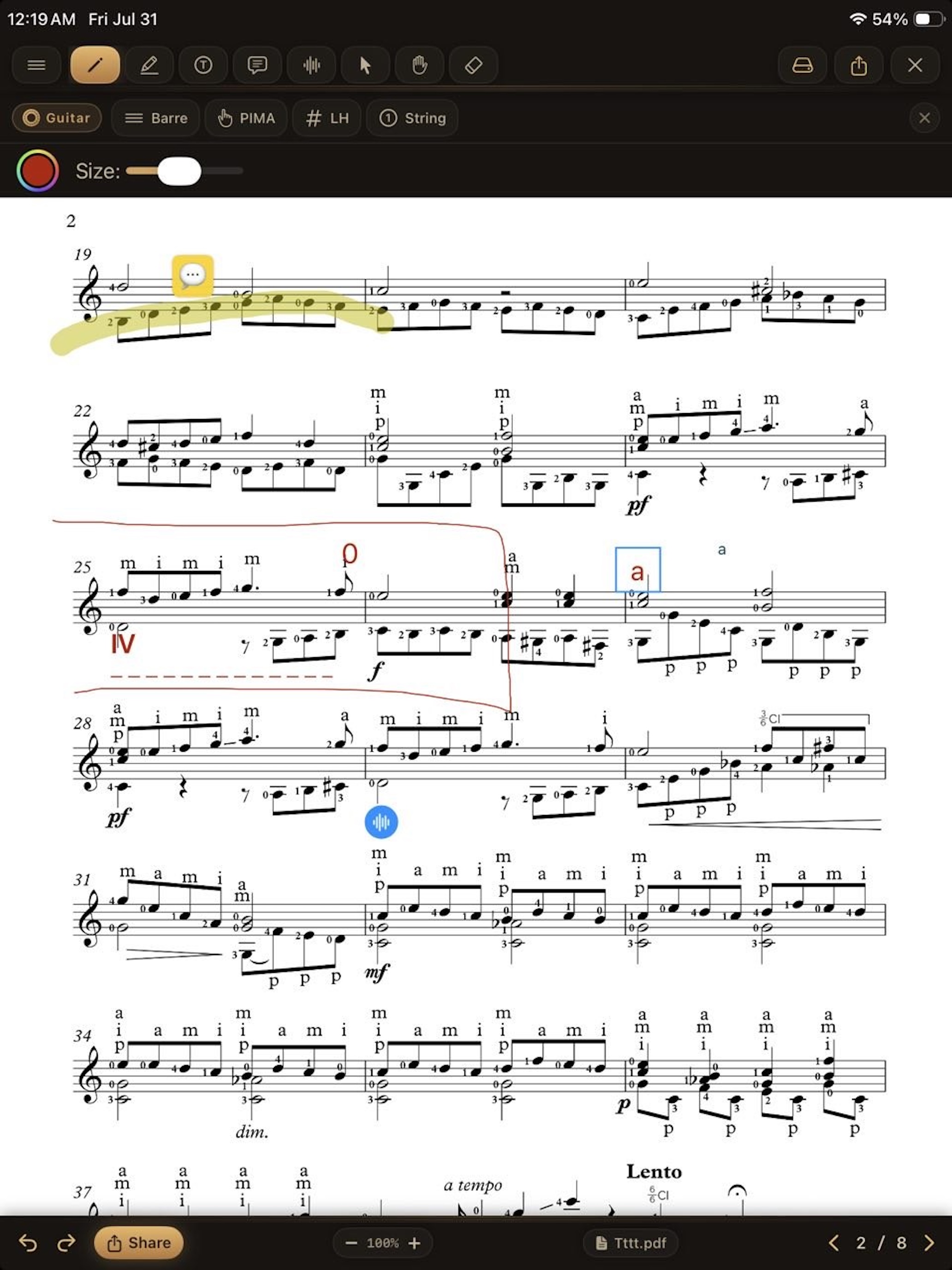
Notice how clean the score remains even with heavy annotations. Multiple users can mark up the page at the exact same time without overwriting each other's work.
Real-Time Screen Tracking Across Different Screen Sizes
Collaborating across different hardware can be tricky when one person is using a 4:3 iPad Pro, another is on an Android smartphone, and a professor is on a 27-inch desktop monitor. No more yelling "MEASURE 42! NO, YOUR OTHER LEFT!" over a laggy video call.
Instead of broadcasting raw pixel coordinates, the presenter broadcasts normalized view center points across the CRDT layer. Followers' viewports automatically pan and auto-center on the active measure in real-time — perfectly handling different screen sizes, resolutions, and aspect ratios without distortion.
Powered by Rust & CRDT Magic
Under the hood, Rusty PIMA uses Yrs (the Rust port of Y.js), a Conflict-free Replicated Data Type engine. What does that mean in plain English? It means if two guitarists place a fingering stamp on the exact same note at the exact same millisecond, the app doesn't crash, glitch, or summon demon spirits. Edits merge seamlessly in real time across iOS, Android, and Desktop. You can read more about this in our technical deep-dive on the egui and Yrs CRDT architecture.
Ready to Ditch the Smudged Pencils?
The Linux desktop client (.deb & .rpm) is available now! iOS, Android, Mac, and Windows versions are coming soon — stay tuned for launch updates.
Download Rusty PIMA →