📦 Product Update
DuetScore Update: Staff and Chords Tools, Top Playback Controls, and More
Place five-line staff notation and chord symbols directly on your score with instant audio playback, control playback from the top menu, and explore the new web PDF to MusicXML converter.
Sometimes a pencil mark on a score is not enough. You want to write an alternate fingering exercise, sketch an ossia measure, or stamp the exact chord without drawing five messy parallel lines by hand.
This update brings dedicated Staff and Chords tools to your toolbar on desktop, iPad, and Android. It also adds a top playback button to listen to your music with one click.
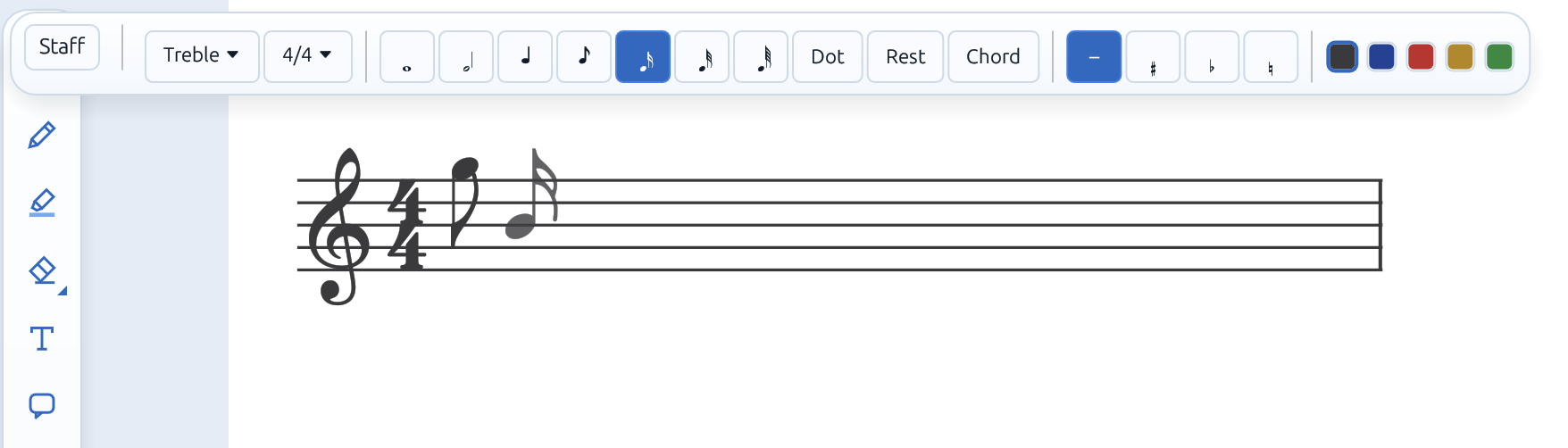
What Is New Since Our Last Post
- The Staff Tool: Draw a five-line musical staff anywhere on your score page. Pick your clef (treble, bass, alto, or tenor) and time signature. Enter notes from whole notes down to 32nd and 64th notes, dotted notes, rests, and chord stacks. Flip stems up or down, shift octaves, and tap Play right on the card to hear your exercise out loud.
- Top Playback Controls: Any score with playable notation now shows a Play button in the top menu next to the zoom controls. Click it to listen, or click Pause to stop. A checkbox lets you choose whether unverified measures play or stay silent. On desktop, right-click any bar and pick "Play Bar" to audition that single measure. On iPad and Android, hold a bar with your finger to bring up the same action.
- The Chords Tool: Pick common chord qualities like major, minor, 7th, diminished, and Phrygian with one tap, or build custom chords with custom roots, alterations, and slash bass notes. Stamp them above any measure. Whenever you select an inserted chord, tap Play to hear its voicing immediately.
- Free PDF to MusicXML Converter: You can now convert vector PDF sheet music into clean MusicXML or MIDI directly on our website under the new Convert tab. It includes an interactive practice loop and side-by-side preview.
- Lyrics and Slurs in MusicXML Export: When you export a score, DuetScore now preserves lyrics from MuseScore, Finale, Sibelius, Dorico, Capella, and LilyPond. It also exports musical slurs and recognizes braced piano staves as a single instrument.
- Swap Tools with Ctrl+R: Press Ctrl+R on desktop to jump straight back to your previous tool without moving your mouse.
Update your app on desktop, iPad, or Android, or visit the web converter to try the new tools on your own scores.