📦 Product Update
DuetScore Update: A Notation Toolbar, Your Own Favorites Toolbar, and More
Stamp staccato, sharps and flats in one tap with the new Notation Toolbar, build your own favorites toolbar, and see everything else we added since our last post.
Stamping a staccato or a sharp should take one tap, not a trip through three menus. This update fixes that, and adds a few other things we built since our last post.
What Is New Since Our Last Post
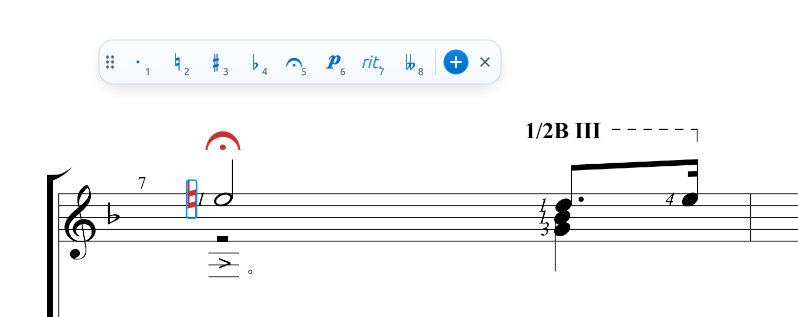
- Notation Toolbar on desktop, iPad, and Android. Keep up to nine of your most used notations (staccato, sharp, flat, natural and more) one tap away. Move it, rearrange it, and add or remove items with the plus button. On desktop, press keys 1 to 9 to pick one. After you stamp a notation, your previous tool comes back automatically.
- Custom Favorites Toolbar on desktop, iPad, and Android. Build a personal toolbar with only the tools you use every day.
- Tip bar for every tool: A short hint appears as you work, so you can find shortcuts without reading a manual.
- Up-Bow double-click, plus new viola and cello fingerboard presets.
- Rounder pen ink and tap-to-dot for cleaner markings.
- Chinese, Japanese, Korean, Cyrillic, and Hebrew text now display correctly on desktop, with support for input methods (IME) in text fields.
- Space bar controls the metronome while its bar is open.
The notation toolbar is the one we are most excited about. Update your app, open a score, and stamp your first sharp in one tap.