DuetScore Desktop Update: Wooden Desks, Talking Paper, and Rehearsal Sanity
A fresh look with our procedural Spruce woodgrain theme, audio QR code export for printed sheet music, Bluetooth foot pedal page turning, and instant student join links.
It has been a busy few weeks since we introduced DuetScore for the Mac. While you were busy testing out facial gestures and winking at your webcams, we were locked in the workshop teaching the desktop app a bunch of new tricks.
First, look at your new practice desk:
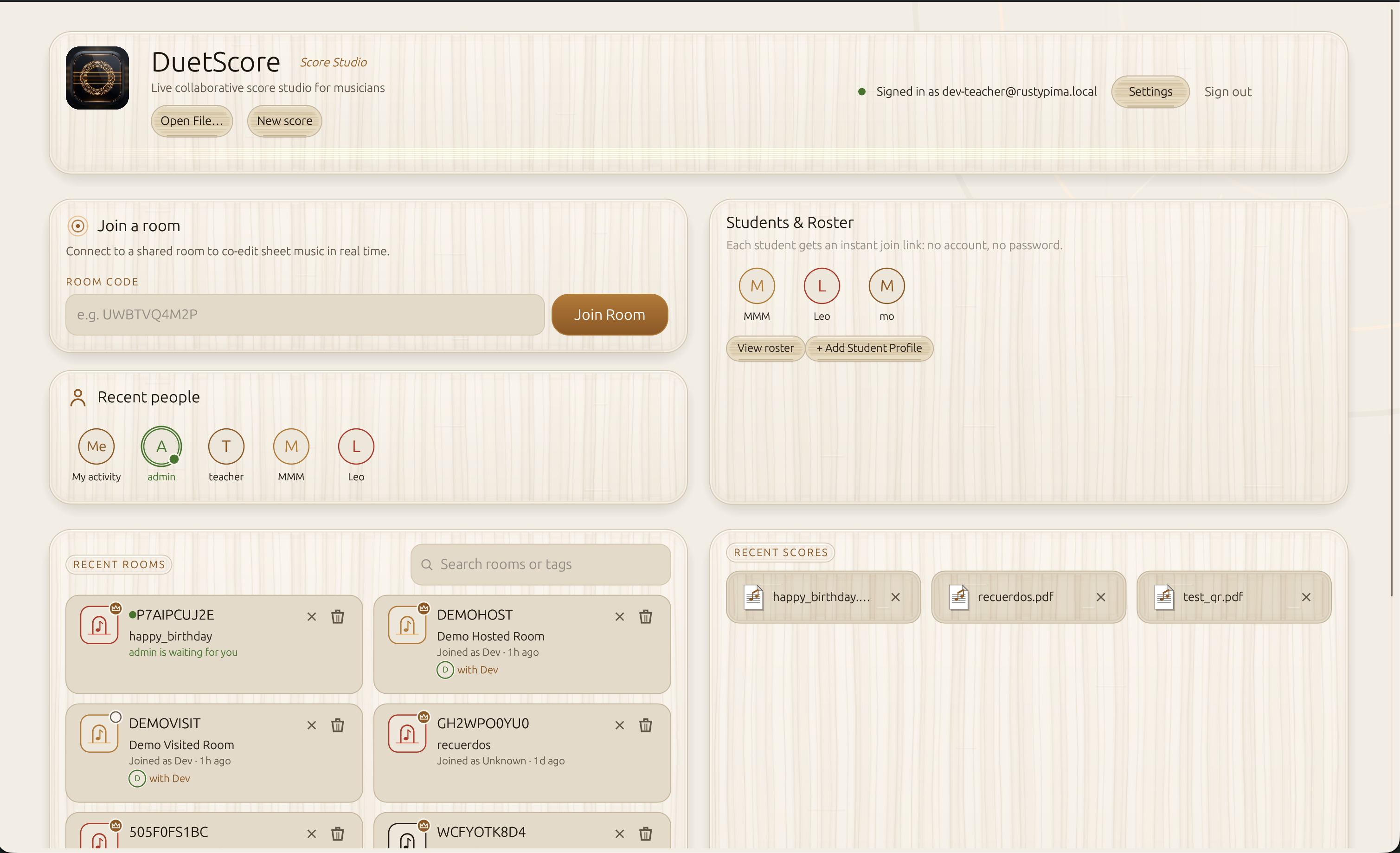
Yes, that is procedural quartersawn spruce. We turned our toolbars into textured tonewood planks, shaped our buttons like tactile wooden keys, and gave the dashboard a relaxed Score Studio layout. If your laptop has to sit on a grand piano or a music stand, it should look like a handcrafted instrument, not an accounting spreadsheet.
Don't panic if you love the shadows: the Spruce look is completely optional and configurable in Settings, and good old Dark Rosewood is still our default for dark orchestra pits and midnight practice sessions.
Also, this is not a Mac exclusive club. Every feature here runs across Mac, Windows, and Linux right now. Even better, Android and iOS builds packing these exact features are currently under app store review, so mobile players can stay tuned.
Everything New on Desktop
- Quartersawn Spruce Theme: A rich, tactile woodgrain aesthetic complete with raised wooden keys, warm amber highlights, and a clean lobby layout. Fully configurable in Settings, with trusty dark mode remaining the default.
- Audio QR Codes on Printed Sheet Music: If you record voice memos or audio demonstrations onto a score, exporting to PDF now places neat QR codes in the page margins with ruby play markers pointing to the exact measure. Print the score out on real paper, hand it to your student, and they can scan the paper with their phone camera to hear the audio demo. Your physical sheet music now speaks.
- Bluetooth Foot Pedal Support: If winking at your screen felt a little too intimate for rehearsal, you can now pair your AirTurn, PageFlip, Donner, or Coda Bluetooth pedals. We built in smart debounce and resting foot protection so an accidental double tap will not launch you straight into the coda.
- Student Roster and One-Click Join Links: Teachers can now manage student profiles right from the dashboard. Send your student a personal link or QR code, and they jump directly into the collaborative score without needing an account or password. When the lesson wraps, a single tap resumes where you left off next week.
- Playable Woodblock Metronome on the Metric Ruler: Press Space while holding the Metric Ruler to hear crisp, wooden click tracks with accent patterns and polyrhythm rails (like 3:2 and 4:3) alongside an animated pulse cursor riding across the measure.
- Score View Filters and Anti-Chaos Protection: Switch instantly between All Markups, Mine Only, Others Only, and Clean Score (viewing pure, untouched sheet music). Even better, guest musicians can now only move and erase their own pencil markings, so your rehearsal partner cannot accidentally delete your fingerings in a panic.
- Two-Page Spread View: Read widescreen piano scores and orchestral parts two pages at a time, side by side, exactly like an open physical binder.
- Instant Score Opening: Heavy scores loaded with audio notes now open instantly on click, while annotations stream in smoothly in the background under a calm status pill.
- Default PDF Handler in Finder: DuetScore now registers as a native macOS document viewer. Double-click any PDF or score file in Finder to open it straight in DuetScore.
- Straight Line Pencil Mode: Snap perfectly straight lines, barlines, and arrows without relying on your morning caffeine stability.
Grab the latest desktop build, switch on the Spruce theme if you feel fancy, and give your music stand the upgrade it deserves.