DuetScore Update: We Now Have a Bar Fixer, MusicXML Export, and New Linux Packages
Fix misread notes right on your PDF score with the new Bar Fixer, export your music to MusicXML and MIDI, draw hairpin and arrow guides, and install DuetScore on Linux with AppImage, Flatpak, or NixOS.
Reading music straight from a PDF works well until one strange tie or crowded chord confuses the score reader. Instead of leaving you stuck with a silent measure, we built a tool so you can fix the bar yourself in a few seconds.
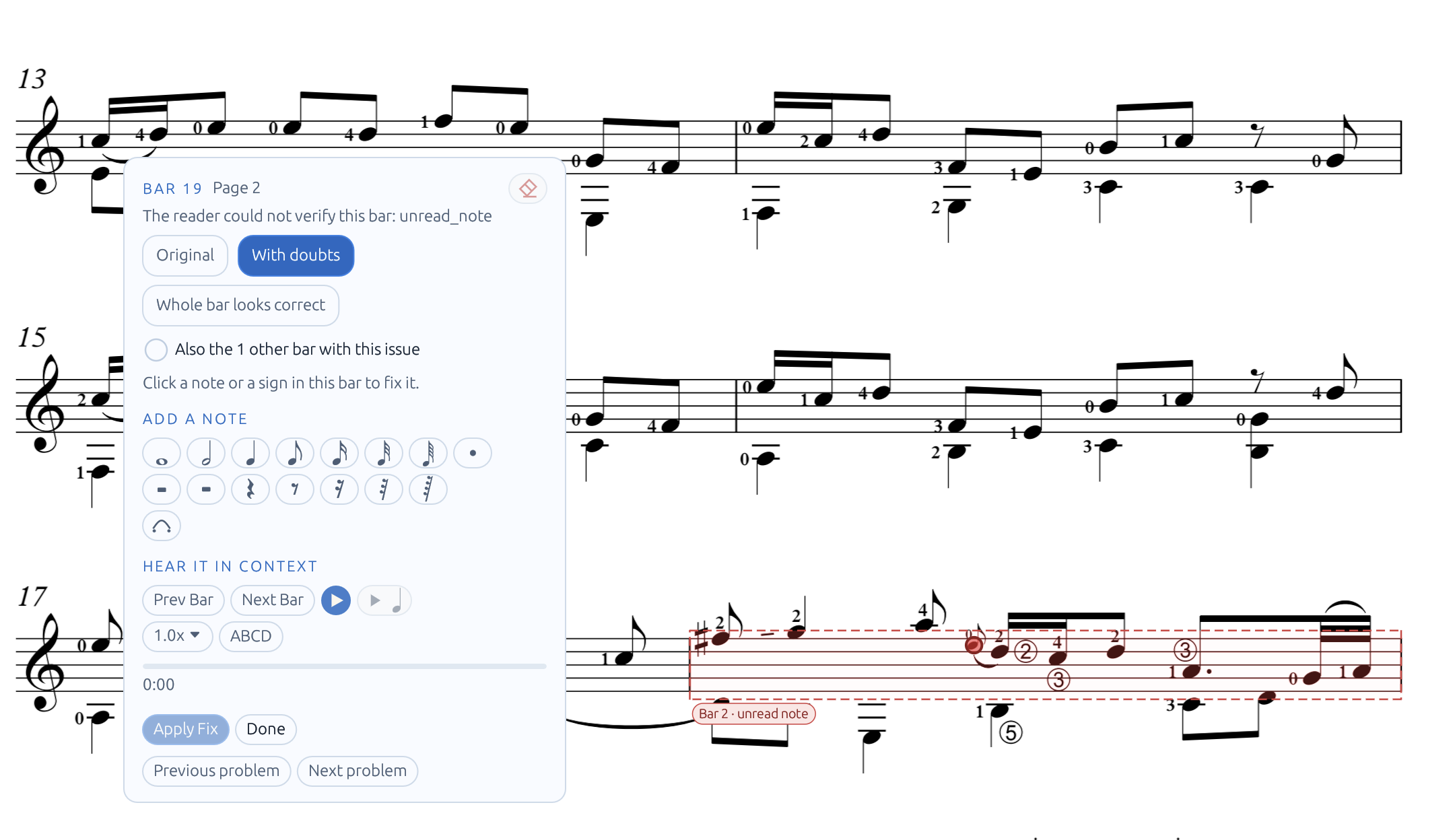
When Passage Audition finds a bar it is not sure about, you can now click Fix it or open the Bar Fixer tool on desktop, iPad, Android, or in your browser with our web Bar Fixer tool.
What Is New Since Our Last Post
Here is everything we added for players and teachers in this update:
- Fix Notes with the Bar Fixer: Click any note in a problem bar to hear it right away. You can drag a note up or down to change its pitch, add a missing note or rest, or delete an extra note.
- Change Note Lengths: Use the length buttons to set any note to a whole, half, quarter, eighth, sixteenth, or 1/32 note, or add a dot. You can fix several notes in the same bar and listen to the result before you click Apply Fix.
- Approve Good Bars Fast: If a bar with a warning already sounds right, click Whole bar looks correct. You can also check the box under it to approve all other bars in the piece that have the same issue with one click.
- Jump Between Problem Bars: Click Previous problem or Next problem (or press
NandShift+Non desktop) to jump straight from one broken bar to the next without searching through the pages. - Export to MusicXML and MIDI: Open Export Score to save your PDF sheet music as a
.musicxmlor.midfile. You can include your Bar Fixer changes, pick page numbers to skip text pages, and use the precision slider to see how many bars will export. - Mark Bars in Doubt for Score Editors: In the Export Score window, choose Flag and Annotate to color bars in doubt red and add numbered marks (
?1,?2). When you open the file in MuseScore, Dorico, or Sibelius, you can find and fix those bars right away. - Hairpin and Arrow Guide Tool: Use the new tool on the Music, Guitar, Violin, and Piano toolbars to draw crescendo, decrescendo, and arrow guides. You can change the opening width, line thickness, color, and dashed style at any time.
- New Linux Packages (AppImage, Flatpak, and NixOS): Besides our
.deb,.rpm, and Arch AUR packages, Linux users can now download an AppImage, install DuetScore with Flatpak, or use our NixOS flake from the download page. - More Music Programs Supported: Our PDF score reader now reads files made with Verovio, OpenSheetMusicDisplay, TuxGuitar, AlphaTab, abcm2ps, abc2svg, and Guitar Pro 6, and reads more scores from MuseScore, Dorico 6, Sibelius, Finale, and LilyPond.
- Split Bars and Long Rests: A bar that is split across a line break or a page turn now plays as one full bar. Rests that last several bars also count and play the right number of silent bars.
- Small Fixes on iPad and Android: You can now pick Wrong timing when reporting a bad bar in Passage Audition. On iPad, the search bar sits in its own row and never covers the Menu button, and on Android, tapping a comment pin opens it under any tool.
Grab the latest update for your computer, iPad, or Android tablet from the download page, or try the Bar Fixer on your own PDF scores.